Webhooks
Webhooks let you react to events inside Skills Workflow in real time — no polling needed. When something happens (a stage changes, a field is updated, a document is created), the platform calls a URL you define or triggers an internal automation.
Quick Start
Goal: Create a webhook that fires an Azure DevOps automation whenever the custom field "Is Customization" changes on a User Story deliverable.
| Step | Field | Value |
|---|---|---|
| 1 | Name | Create Work Item when Is Customization is unchecked |
| 2 | Active | On |
| 3 | Event | UserFieldValueUpdated |
| 4 | Document | Deliverable |
| 5 | Automation | On |
| 6 | Automation Workflow | Azure DevOps – Create Work Item in Visual Studio |
| 7 | Business Object Type Name | User Story |
| 8 | Detail Path Expression | ColumnName Condition: Equal Value: Is Customization |
That's it — the webhook is ready. Read on to understand each section of the form.
Using Webhooks with Automations
Webhooks can also act as entry points for Automation Workflows. Instead of sending the event to an external URL, enable Automation and select an Automation Workflow as the destination.
Use this pattern when the event should start a controlled workflow: call one or more APIs, map data, generate files, send emails, or return a structured response. The automation can access the webhook request through {{['#HttpRequest']}}, including its body, headers, query values and other request context.
For the automation model, expression syntax and available actions, see Automations and the Actions reference.
Configuring a Webhook
Navigate to Maintenance > Webhooks and click Create New Webhook.
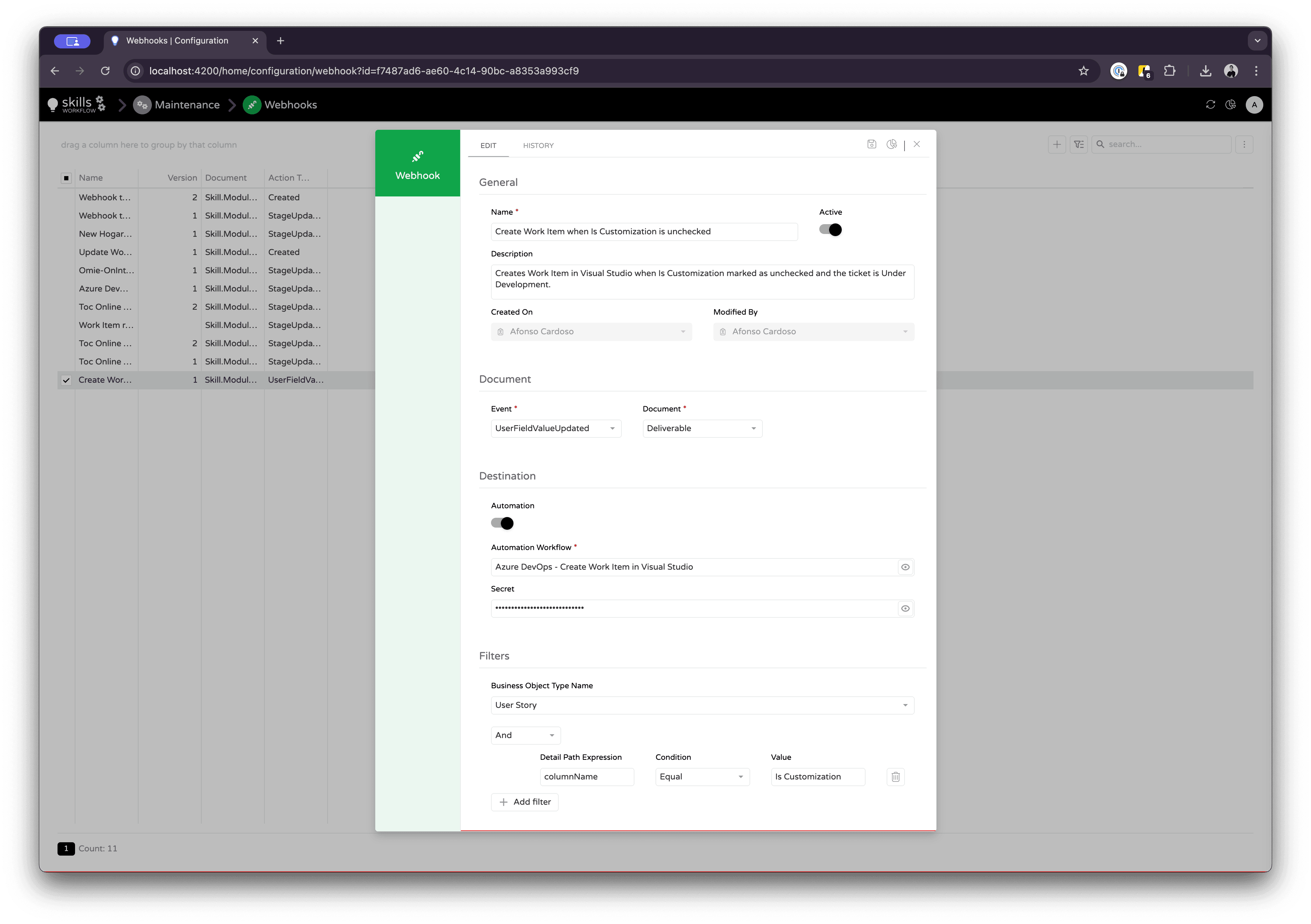
The form is divided into four sections, from top to bottom. Fill them out in order.
1. General
| Field | Description |
|---|---|
| Name | A descriptive title for the webhook. Used internally to identify it. |
| Active | Toggle to enable or disable the webhook. Only active webhooks fire. |
| Description | A short explanation of what the webhook does and when it should trigger. |
| Created On / Modified By | Automatically filled metadata. |
2. Document
This section defines what triggers the webhook.
Event
The type of event that should fire the webhook. Choose from the dropdown or type a custom value.
- Documents
- Workflow
- Authentication
- Roles & Teams
- Other
| Event | When it fires |
|---|---|
Created | A document was created. |
Updated | A document property was modified. |
Deleted | A document was deleted. |
UserFieldValueUpdated | A custom (user-defined) field on a document changed. |
TimeUpdated | Timesheet data was updated. |
| Event | When it fires |
|---|---|
StageUpdated | The workflow stage of a document changed (state transition). |
| Event | When it fires |
|---|---|
LoginSucceeded | A user logged in successfully. |
LoginFailed | A login attempt failed. |
| Event | When it fires |
|---|---|
UserRoleAdded | A role was assigned to a user. |
UserRoleRemoved | A role was removed from a user. |
UserEffectiveRolesChanged | A user's effective roles changed (hierarchy recalculation). |
UserImageUpdated | A user's profile image was updated. |
RoleAddedToRole | A child role was added to a role. |
RoleRemovedFromRole | A child role was removed from a role. |
TeamAdded | A team member was added to a document. |
TeamRemoved | A team member was removed from a document. |
| Event | When it fires |
|---|---|
BatchExecuted | A batch operation was executed (e.g., bulk delete). |
FileDownloaded | A file was downloaded from the system. |
Executed | A generic execution event. |
The Event dropdown also accepts custom values, so you can type any event name if needed.
Document Type
The entity type the webhook listens to. Loaded from the system and varies per tenant.
Full list of document types
| Document Type | Full Type Name |
|---|---|
| Assignment | Skill.Module.BusinessObjects.Assignment |
| Bill | Skill.Module.BusinessObjects.Bill |
| Brand | Skill.Module.BusinessObjects.Brand |
| Client | Skill.Module.BusinessObjects.Client |
| Client Credit Note | Skill.Module.BusinessObjects.ClientCreditNote |
| Commercial Client | Skill.Module.BusinessObjects.CommercialClient |
| Commercial Client Product | Skill.Module.BusinessObjects.CommercialClientProduct |
| Contract | Skill.Module.BusinessObjects.Contract |
| Deliverable (Job) | Skill.Module.BusinessObjects.Deliverable |
| Document Brief | Skill.Module.BusinessObjects.DocumentBrief |
| Document State | Skill.Module.BusinessObjects.DocumentState |
| Document Tag | Skill.Module.BusinessObjects.DocumentTag |
| Document Task | Skill.Module.BusinessObjects.DocumentTask |
| Estimate | Skill.Module.BusinessObjects.Estimate |
| Expense | Skill.Module.BusinessObjects.Expense |
| Expense Item | Skill.Module.BusinessObjects.ExpenseItem |
| File | Skill.Module.BusinessObjects.FileSystemObject |
| Job Type | Skill.Module.BusinessObjects.JobType |
| Lead | Skill.Module.BusinessObjects.CRM.Lead |
| Person | Skill.Module.BusinessObjects.Person |
| Project | Skill.Module.BusinessObjects.Project |
| Purchase Order | Skill.Module.BusinessObjects.PurchaseOrder |
| Supplier Invoice | Skill.Module.BusinessObjects.SupplierInvoice |
| Supplier Note | Skill.Module.BusinessObjects.SupplierNote |
| Supplier Request | Skill.Module.BusinessObjects.SupplierRequest |
| Task | Skill.Module.BusinessObjects.Task |
| Tender | Skill.Module.BusinessObjects.Tender |
| Timesheet | Skill.Module.BusinessObjects.Timesheet |
| User | Skill.Module.BusinessObjects.User |
| Workflow State | Skill.Module.BusinessObjects.WorkflowState |
| Workflow State Transition | Skill.Module.BusinessObjects.WorkflowStateTransition |
Additional document types may be available depending on your tenant configuration. Use the GET /api/v3/document-types/lookup endpoint to retrieve the full list.
3. Destination
Where the webhook sends its payload when triggered.
- External URL
- Automation Workflow
Leave Automation toggled off and fill in:
-
URL — The external endpoint to call.
Example:https://example.com/webhooks/my-webhook
External URL destination
Toggle Automation on and select:
-
Automation Workflow — The internal integration workflow to run.
Example:Azure DevOps – Create Work Item in Visual Studio
Automation Workflow destination
- Secret — A key shared with the destination to authenticate the webhook request.
4. Filters
Filters let you narrow when the webhook fires. Without filters, every occurrence of the selected Event + Document triggers it.
Business Object Type Name
Optionally limit the webhook to a specific business object type (e.g., User Story, Estimate).
Detail Filters
Each filter row has four parts:
| Part | Description |
|---|---|
| Group Condition | And (all filters must match) or Or (any filter can match). |
| Detail Path Expression | The property name inside the event's detail payload to evaluate. |
| Condition | Equal, NotEqual, Contains, or NotContains. |
| Value | The value to compare against. |
Click + Add filter to add more rows.
The fields you can use in Detail Path Expression depend on the Event you selected. Each event type produces a different payload. See the reference below.
Detail Path Expression Fields per Event
Use the tabs below to find the exact field names available for each event type.
- StageUpdated
- UserFieldValueUpdated
- Created / Updated / Deleted
- Login Events
- Role Events
- BatchExecuted
- Other Events
Fired when a document's workflow stage changes.
| Detail Path Expression | Type | Description |
|---|---|---|
WorkflowStageTransitionId | guid | ID of the stage transition. |
WorkflowStageTransitionName | string | Name of the transition. |
WorkflowStageTransitionLocalizedName | string | Localized name of the transition. |
FromWorkflowStageId | guid | ID of the source stage. |
FromWorkflowStageName | string | Name of the source stage. |
FromWorkflowStageLocalizedName | string | Localized name of the source stage. |
ToWorkflowStageId | guid | ID of the destination stage. |
ToWorkflowStageName | string | Name of the destination stage. |
ToWorkflowStageLocalizedName | string | Localized name of the destination stage. |
WorkflowId | guid | ID of the workflow. |
WorkflowName | string | Name of the workflow. |
DepartmentId | guid | ID of the department (if applicable). |
When the transition is resolved from individual stage objects, the WorkflowStageTransition* fields may not be present.
Common example:
| Detail Path Expression | Condition | Value |
|---|---|---|
ToWorkflowStageName | Equal | Under Development |
Fired when a custom user field value changes on a document.
| Detail Path Expression | Type | Description |
|---|---|---|
ColumnName | string | Database name of the user field that changed. |
Value | object | The new value of the field. |
Common example:
| Detail Path Expression | Condition | Value |
|---|---|---|
ColumnName | Equal | Is Customization |
Fired when a document is created, updated, or deleted. The payload contains a dynamic set of properties — every persistent property that was changed on the document.
The exact fields depend on the document type and which properties changed. Examples:
| Detail Path Expression | Type | Description |
|---|---|---|
Name | string | Document name (if changed). |
BeginDate | datetime | Begin date (if changed). |
EndDate | datetime | End date (if changed). |
| ...any document property | varies | Any persistent property that was modified. |
TimeUpdated, TeamAdded, TeamRemoved, and RoleAddedToRole / RoleRemovedFromRole also use this same dynamic payload pattern.
Fired on LoginSucceeded or LoginFailed.
| Detail Path Expression | Type | Description |
|---|---|---|
LoginType | string | Auth method: SsoToken, Token, or RefreshToken. |
Username | string | Username of the login attempt. |
LoginAsDelegate | boolean | Whether the login was an impersonation. |
DelegatedUserName | string | Delegated username (if applicable). |
FailureReason | string | Reason for failure (LoginFailed only). |
Common example:
| Detail Path Expression | Condition | Value |
|---|---|---|
Username | Equal | john.doe |
Fired on UserRoleAdded or UserRoleRemoved.
| Detail Path Expression | Type | Description |
|---|---|---|
RoleId | string | ID of the role. |
RoleName | string | Name of the role. |
UserImageUpdated and UserEffectiveRolesChanged do not carry any detail fields.
Fired on BatchExecuted.
| Detail Path Expression | Type | Description |
|---|---|---|
DocumentType | string | Full type name of the business object. |
Url | string | The API endpoint where the batch ran. |
FileDownloaded does not have a documented detail-field contract.
These events are available but carry no filterable detail fields:
UserImageUpdatedUserEffectiveRolesChangedFileDownloadedExecuted
They trigger the webhook for every occurrence — no Detail Path Expression filtering is possible.
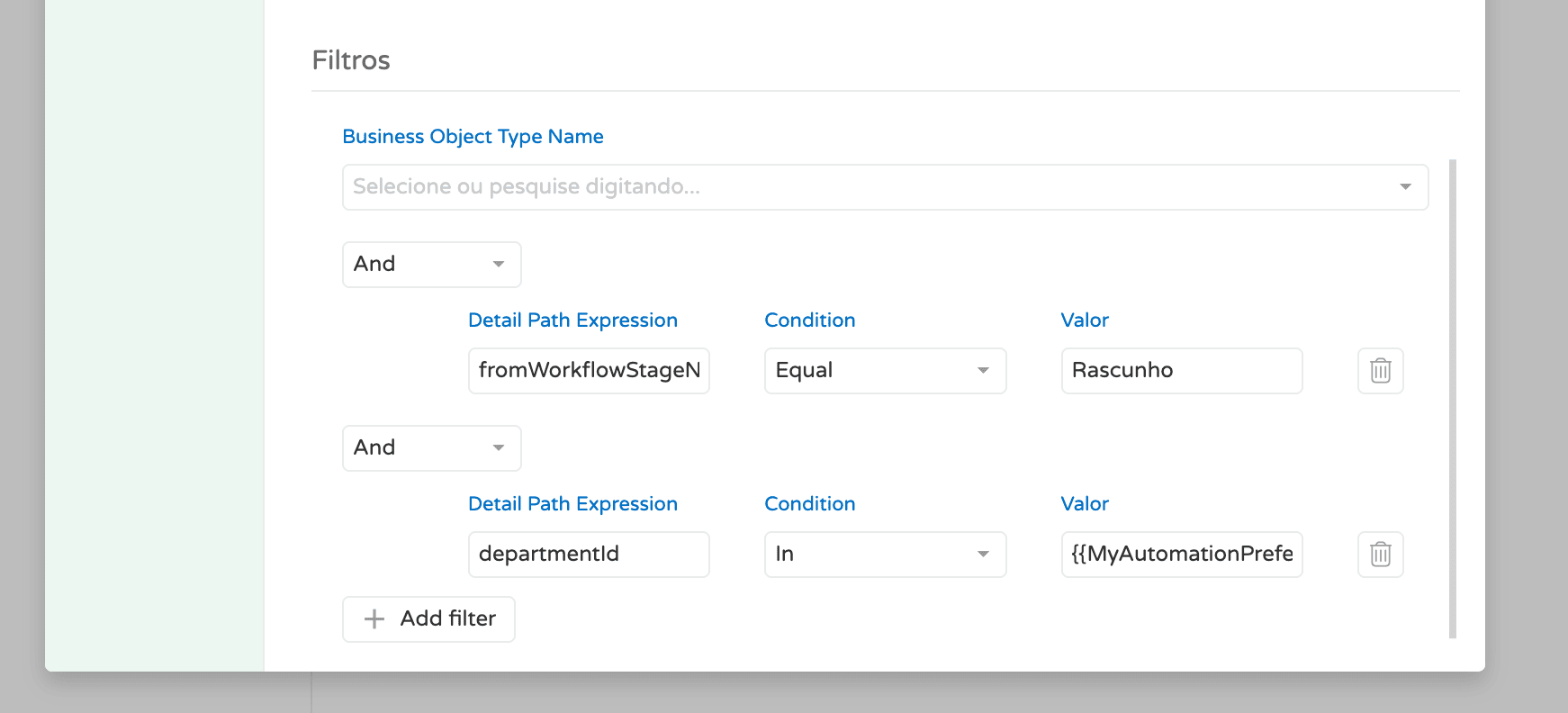
Dynamic Filter Values
You can use System Parameters as dynamic values in the Value field. Reference them with:
{{SystemPreferenceName/KeyName}}
Example: {{MyAutomationPreferences/departments}}
{
  "user": "skills-user",
  "password": "my-strong-password",
  "departments": [
    "6f51b21e-2dcc-4f5e-aebb-491b54800bf1",
    "a733e914-18ea-4c92-94b4-59491badc974",
    "ecc30504-1f5c-4b3b-a864-da85d04ebabe",
    "d42168e4-f690-4546-8197-54ba344a1806"
  ]
}
Examples
Trigger when a custom field changes
Fire a webhook when "Is Customization" changes on a deliverable, filtered to the User Story business object type:
| Field | Value |
|---|---|
| Event | UserFieldValueUpdated |
| Document | Deliverable |
| Business Object Type Name | User Story |
| Detail Path Expression | ColumnName |
| Condition | Equal |
| Value | Is Customization |
Trigger on a stage transition
Fire a webhook when a deliverable moves to "Under Development":
| Field | Value |
|---|---|
| Event | StageUpdated |
| Document | Deliverable |
| Detail Path Expression | ToWorkflowStageName |
| Condition | Equal |
| Value | Under Development |
Trigger on login failure
Fire a webhook when a specific user fails to log in:
| Field | Value |
|---|---|
| Event | LoginFailed |
| Detail Path Expression | Username |
| Condition | Equal |
| Value | john.doe |
Multiple filters with AND logic
Trigger only when a deliverable's custom field "Priority" is set to "High":
| # | Group Condition | Detail Path Expression | Condition | Value |
|---|---|---|---|---|
| 1 | And | ColumnName | Equal | Priority |
| 2 | And | Value | Equal | High |
API Reference
Webhook subscriptions can also be managed via REST API. Base URL: /api/webhook-subscriptions
Endpoints
List All Webhooks
GET /api/webhook-subscriptions
Returns all webhook subscriptions for the current tenant.
Response: 200 OK — Array of WebhookSubscription objects.
Get Webhook by ID
GET /api/webhook-subscriptions/{id}
| Parameter | Type | Description |
|---|---|---|
id | guid | The webhook subscription ID. |
Response: 200 OK — A single WebhookSubscription object.
Create Webhook
POST /api/webhook-subscriptions
Request Body:
{
  "Name": "My Webhook",
  "Description": "Triggers when a deliverable is created",
  "ActionType": "Created",
  "DocumentType": "Skill.Module.BusinessObjects.Deliverable",
  "Url": "https://example.com/webhook-endpoint",
  "Secret": "my-secret-key",
  "Active": true,
  "IsAutomation": false,
  "AutomationId": null,
  "BusinessObjectTypeName": null,
  "DetailFilters": [
    {
      "groupCondition": "And",
      "jsonPathExpression": "ColumnName",
      "condition": "Equal",
      "value": "Priority"
    }
  ]
}
| Field | Type | Required | Description |
|---|---|---|---|
Name | string | Yes | Display name of the webhook. |
Description | string | No | Purpose description. |
ActionType | string | Yes | The event type (e.g., Created, StageUpdated). |
DocumentType | string | Yes | Full type name (e.g., Skill.Module.BusinessObjects.Deliverable). |
Url | string | Yes* | Destination URL. Required unless IsAutomation is true. |
Secret | string | No | Secret key for request authentication. |
Active | boolean | No | Whether the webhook is enabled. Defaults to false. |
IsAutomation | boolean | No | true to trigger an internal automation instead of a URL. |
AutomationId | guid | No | ID of the automation workflow. Required when IsAutomation is true. |
BusinessObjectTypeName | string | No | Filter by business object type name. |
DetailFilters | array | No | Array of detail filter objects. |
DetailFilter object:
| Field | Type | Description |
|---|---|---|
groupCondition | string | And or Or. |
jsonPathExpression | string | The property name to evaluate in the event detail payload. |
condition | string | Equal, NotEqual, Contains, NotContains. |
value | string | The value to compare against. |
Response: 201 Created
Update Webhook
PUT /api/webhook-subscriptions/{id}
Same body as Create. Response: 200 OK
Delete Webhook
DELETE /api/webhook-subscriptions/{id}
Response: 200 OK
Get Invocation History
GET /api/webhook-subscriptions/{id}/invocation-history
| Parameter | Type | Required | Description |
|---|---|---|---|
id | guid | Yes | Webhook subscription ID. |
fromDateUtc | datetime | No | Start date filter (UTC). |
toDateUtc | datetime | No | End date filter (UTC). |
take | int | No | Number of records (default: 100). |
continuationToken | string | No | Pagination token. |
Response: 200 OK — Array of invocation records.
Response Object
{
  "id": "3fa85f64-5717-4562-b3fc-2c963f66afa6",
  "tenantId": "c8d054c7-9933-4b6d-9e55-66ed1ba9526d",
  "name": "My Webhook",
  "description": "Triggers when a deliverable is created",
  "url": "https://example.com/webhook-endpoint",
  "secret": "my-secret-key",
  "actionType": "Created",
  "documentType": "Skill.Module.BusinessObjects.Deliverable",
  "active": true,
  "createdOnUtc": "2026-04-08T12:00:00Z",
  "createdById": "315d6513-3418-4369-8e87-c204316c27c2",
  "modifiedOnUtc": "2026-04-08T12:00:00Z",
  "modifiedById": "315d6513-3418-4369-8e87-c204316c27c2"
}
Required Permissions
| Operation | Required Role |
|---|---|
| List / Get | WebhookSubscriptionGet |
| Create | WebhookSubscriptionCreate |
| Update | WebhookSubscriptionWrite |
| Delete | WebhookSubscriptionDelete |
| Navigate (UI) | WebhookSubscriptionNavigate |