Azure AD Blocker
Description
This article describes the Azure AD Blocker integration between Microsoft Entra ID (Azure AD) and Skills Workflow.
Unrecorded time is one of the hardest things for an agency to fix. Timesheets are everyone's lowest priority, reminders get ignored, and by the time the gap is visible in a report it is weeks old — and with it, the ability to bill accurately, measure utilisation or trust a project's cost.
This integration gives that problem consequences. Anyone required to complete timesheets who falls behind has their Microsoft 365 sign-in disabled, and gets it back by submitting an unblock request once they are up to date. It is a deliberately blunt instrument, and it works because it makes recording time the path of least resistance rather than the thing that can always wait until tomorrow.
Both halves are automatic: the blocking, and the restoring.
How It Works
Blocking
Skills Workflow identifies active users who are required to complete timesheets and are behind, and disables the matching Microsoft account. The user is then marked in Skills Workflow as blocked, so the state is visible in both systems.
Unblocking
The user (or their manager) raises an unblock request in Skills Workflow. Creating that request is the trigger — no administrator has to action it — and the Microsoft account is re-enabled automatically.
What the Agency Needs to Provide
- An app registration in Microsoft Entra ID, with the permissions and client secret described below, so Skills Workflow can enable and disable accounts.
- Agreement on who is in scope — the integration only ever considers users flagged as required to complete timesheets.
- A process for unblock requests, since raising one is what restores access.
Good to Know
- Only users required to complete timesheets are ever affected. Anyone without that requirement is out of scope entirely.
- Blocking disables the Microsoft account, not the Skills Workflow account — it removes access to mail and everything else behind the corporate sign-in, which is what gives it its effect.
- The unblock is immediate and self-service. Raising the request re-enables the account; nobody has to wait for IT.
- The connection depends on the Entra ID client secret below, which expires. If blocking or unblocking silently stops working, that credential is the first thing to check.
Azure Portal Configuration
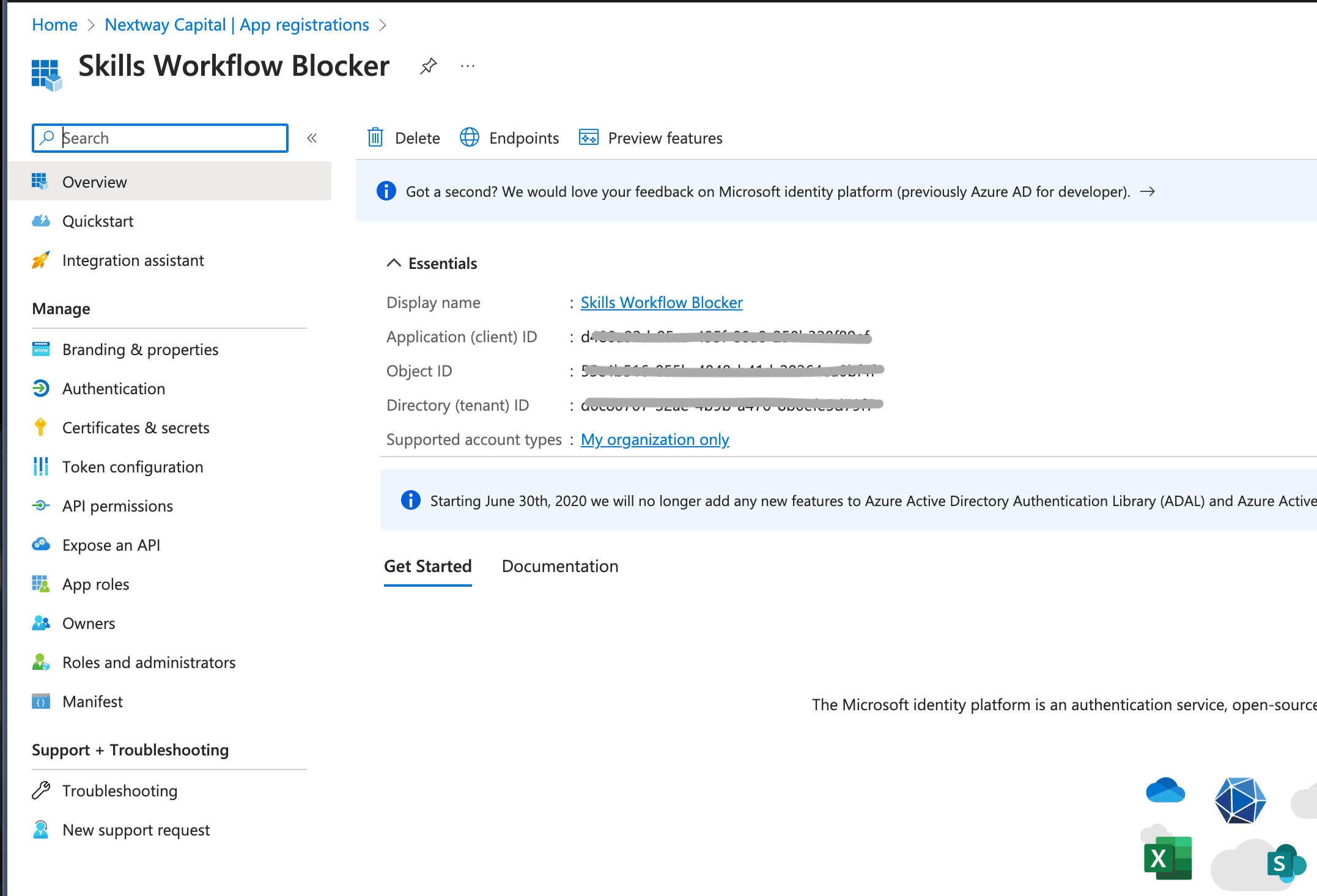
Using Microsoft Entra ID it is necessary to create a app registration to enable Integration authentication with AD allowing to update users:
Create New App Registration
- Navigate to App Registration
- Press New Registration
- Set name as Shown Below
- Press Register
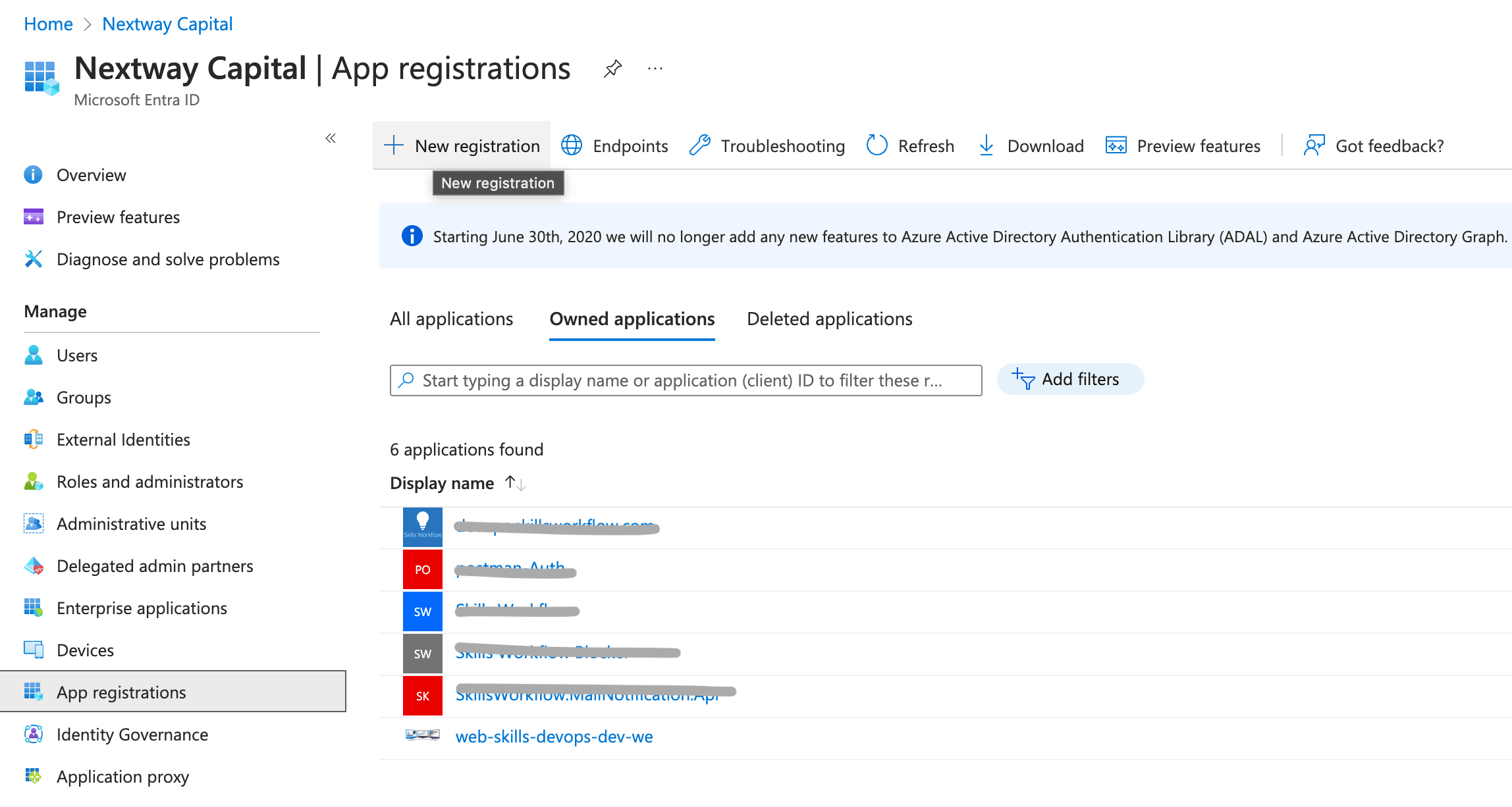
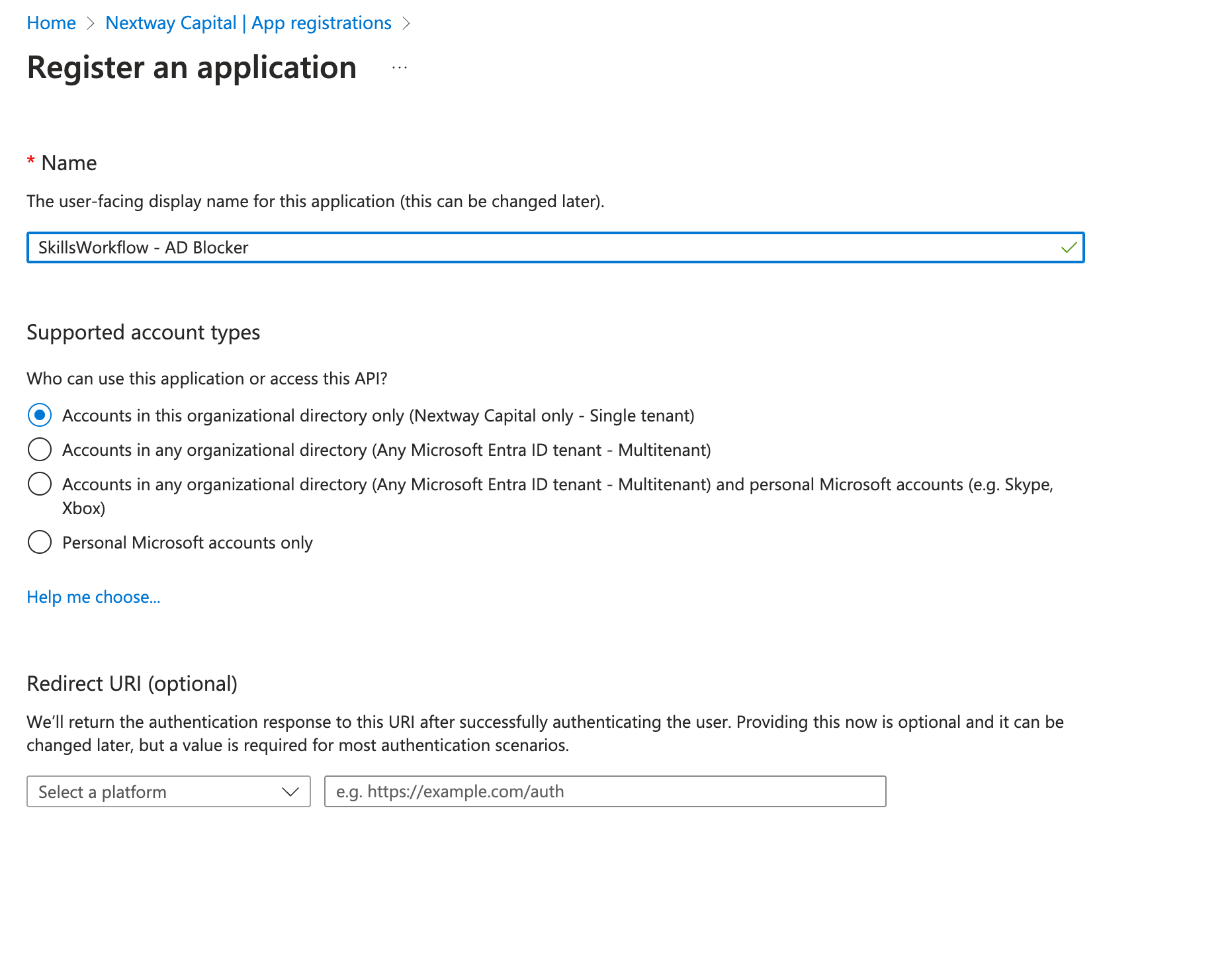
Api Permissions for Graph Api
- Navigate to Api permissions
- Add the following permission for Graph Api:
- User.ManageIdentities.All
- User.ReadWrite.All
- Grant admin consent for "Tenant Name"
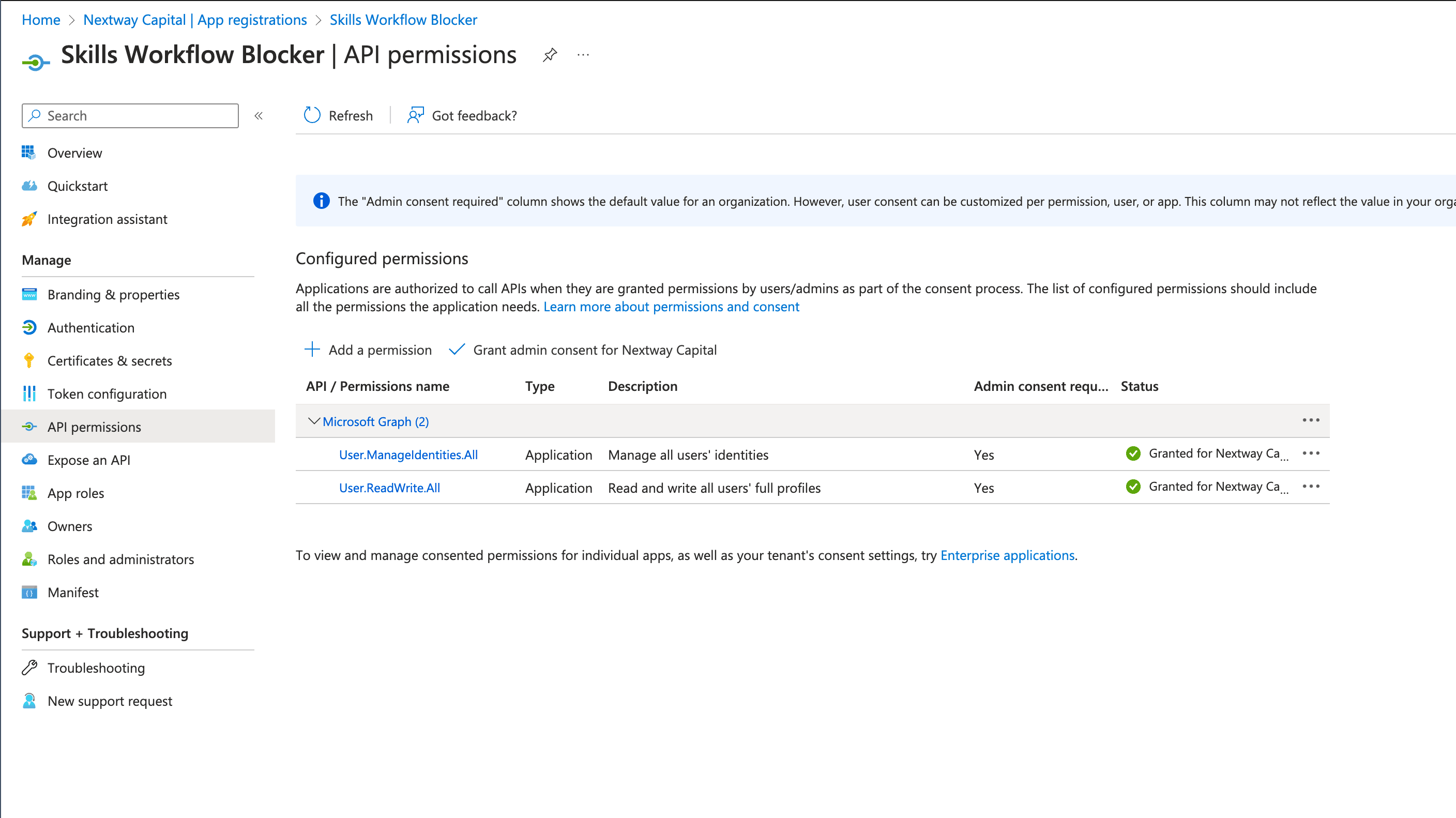
Note that all the permissions should have a green Status.
Client Secret
- Navigate to Certificates & secrets
- Navigate to Client Secrets tab
- Add new Client Secret with the greatest expiration date
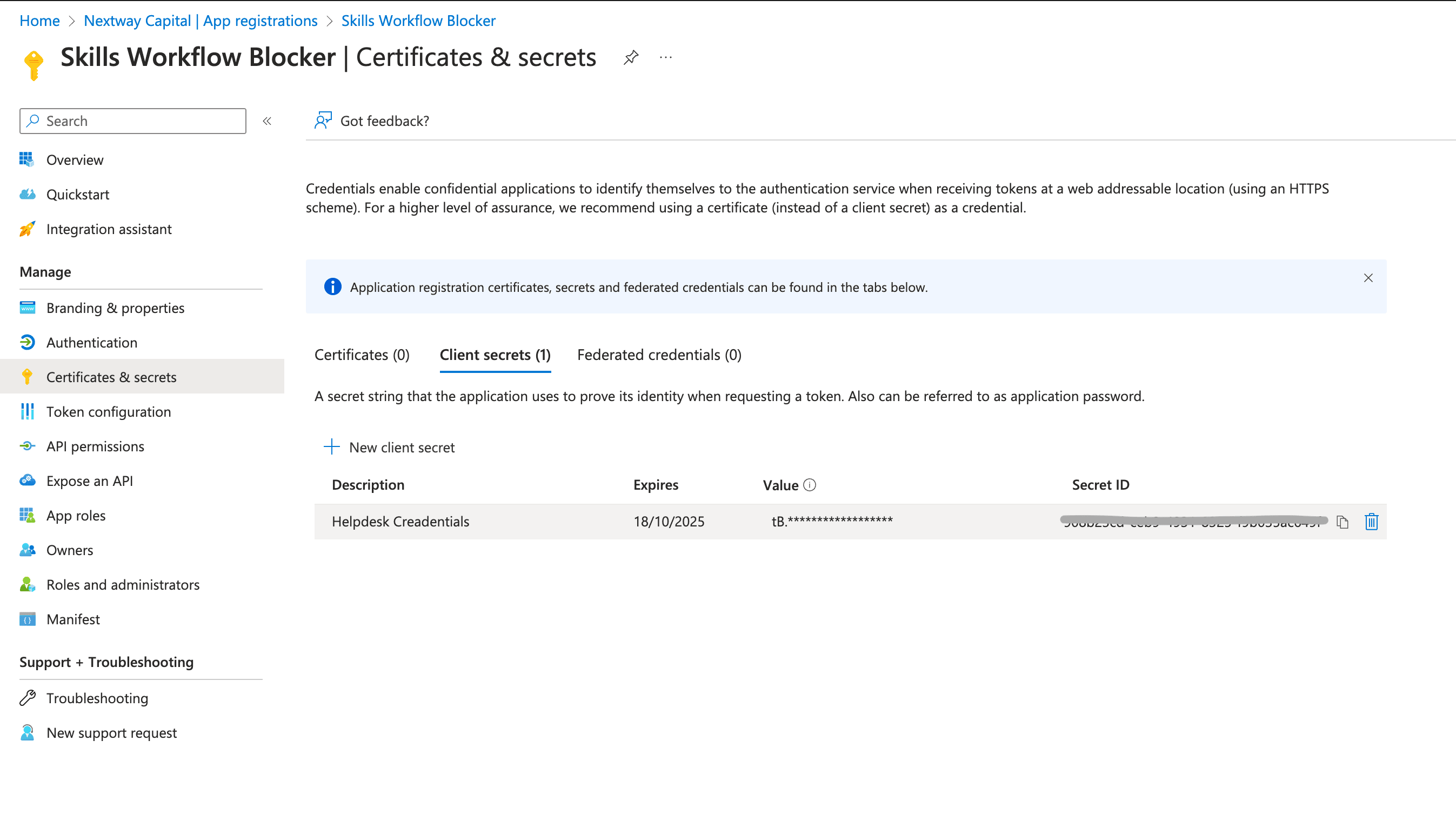
Copy right after creation the value key as it only shows one time
Definitions
The creation of the App Registration should have a combination of the following:
- TenantId
- ClientId
- Client Secret (created on step above)
Installation
To Install the Azure AD Blocker integration please go to the Marketplace and install the Azure AD Blocker Package
Package Content
The exported package (Marketplace source files below) consists of:
| Name | Type | Version | Stage | Role |
|---|---|---|---|---|
| Office365 - Block Missing TimeSheets | Automation | 0 | Active | Scans for delinquent users and disables their Azure AD account |
| Office365 - Unblock Missing Timesheets | Automation | 0 | Active | Re-enables an Azure AD account when an unblock request is created |
| Get Delinquent Users | Query | 1 | Active | Lists users required to fill timesheets, active, with a valid AD username |
| Office365-ShouldBlockUser-Get | Query | 1 | Active | Checks whether a single username still needs to be blocked |
| Office365 - UnblockUserRequest | Webhook | 1 | Active | Fires the unblock automation when an UnblockUserRequest is created |
| Office365 - UnblockUserRequest.Create | Webhook | (unversioned) | Active | A second webhook pointed directly at the same automation's execute URL, on a playground-dev tenant — looks like a leftover test/duplicate rather than the production trigger |
Source: [Azure AD Blocker] [Integrations] Block Missing Time Sheets v0 (Automation) {Active}.json, [Azure AD Blocker] [Integrations] Unblock Missing Timesheets v0 (Automation) {Active}.json, [Azure AD Blocker] [Integrations] Get Delinquent Users v1 (Query) {Active}.json, [Azure AD Blocker] [Integrations] Office365-ShouldBlockUser-Get v1 (Query) {Active}.json, [Azure AD Blocker] [Integrations] Unblock User Request v1 (Webhook) {Active}.json, [Azure AD Blocker] [Integrations] Unblock User Request Create v1 (Webhook) {Active}.json.
This is one more Query and one more Webhook than the "2 Automations, 1 Query, 1 Webhook" previously documented here — kept above rather than removed, since nothing in the export contradicts the original count, it's just incomplete.
How It Works
- Blocking (
Office365 - Block Missing TimeSheets, triggered on demand via an HTTP request carrying aTenantName— no scheduler is present in this export, so what actually invokes it on a cadence isn't shown): authenticates to Azure AD, calls Skills Workflow's own analytics endpoint to runGetDelinquentUsers(users who must fill timesheets, are active, and have a valid AD username), then for each one disables the Azure AD account (PATCH https://graph.microsoft.com/beta/users/{AdUserName},accountEnabled: false) and, on success, patches the user's own "is blocked in AD" flag back in Skills Workflow. - Unblocking: the
Office365 - UnblockUserRequestwebhook firesOffice365 - Unblock Missing Timesheets(confirmed by matching automation ide9c93597-a950-4176-8ae5-00e5e95b0d34) whenever anUnblockUserRequestdocument is created. The automation re-enables the corresponding Azure AD account (PATCH https://graph.microsoft.com/beta/users/{userName},accountEnabled: true).
Configuration
In both Automations is necessary to set the Azure AD parameters obtained in the AzureAdAuthentication Action:
- tenantId
- clientId
- clientSecret
The exported Block Missing Time Sheets and Unblock Missing Timesheets automations embed a live-looking tenantId/clientId/clientSecret directly in the AzureAdAuthentication action, rather than reading them from a configuration key — and the two Webhook files embed their own shared secret values in plain text. None of these values are reproduced here. If this export is genuine, treat the Azure AD app credential and both webhook secrets as compromised and rotate them.
Open Questions
- No scheduler is present on
Block Missing Time Sheetsin this export, so what actually triggers the periodic scan (and how often) isn't determinable — only that it expects an HTTP request with aTenantNamequery parameter. Office365 - UnblockUserRequest.Createtargets aplayground-devtenant URL and has noautomationId— whether it's still live or a leftover test artifact is not determinable from the export.